Use case

For managing agents.

Stay the system of record while external contractors and inspectors keep using their own tools — consolidate every PDF report into one portfolio-wide audit trail.

7‑day trial. No card. Cancel anytime.

Compare with other teams? Home →

Home Managing agents
Best for

Managing agents responsible for fire door compliance across a portfolio of properties they do not inspect themselves

Block managers, estate managers and FM leads who hold the compliance record but delegate physical inspection work to external contractors and third-party inspectors using their own apps.

Primary gain

One consolidated record per building

Reports from any external inspector land in the same building history, the same door-level trail, the same portfolio view — without anyone being forced to change tools.

Proof point

Audit trail that survives every contractor handoff

Door histories accumulate across contracts. When the inspector changes, the auditor asks, or the contract ends, the trail is intact and exportable in a click.

Covers
PDF consolidation Portfolio view Audit trail Multi-contractor Client portal CSV exports
What good looks like for this team

Three things that
change when it works.

Best for managing agents who need a defensible compliance record per building when inspection work is delegated across multiple contractors.

Building 14 — door history
Contractor A — PDF imported Mar 2026 Imported
Contractor B — PDF imported Jun 2026 Imported
In-house QA visit Sep 2026 Captured
One door history — three sources Consolidated
Benefit 01
One master
record.
External inspectors keep their own tools. Their PDFs land in your workspace, the data extracts for review, and a single commit puts every finding under the same building, the same door, the same trail. The contractor never has to change anything.
  • PDFs from any inspector import without template setup
  • Property, doors, components and pass/fail extract for review
  • One commit lands the inspection in the master record
Portfolio status — Q3 2026
Building 14 — outstanding 6 doors
Building 22 — scheduled Visit 14 Oct
Building 31 — complete 21 doors
Live across every contractor Estate view
Benefit 02
Portfolio
visibility.
Outstanding, scheduled and complete visible across every building in the portfolio. The tracking spreadsheet stops being a parallel job — the same record that logs the inspection drives the estate-wide view.
  • Portfolio-wide outstanding, scheduled and complete at a glance
  • No parallel tracking spreadsheet to reconcile
  • Live status visible to clients via the portal
Handover pack — Building 14
Full inspection history Q1–Q3 PDF
Door-level CSV across contractors CSV
Shared via client portal Live
No folder reconstruction Ready
Benefit 03
Audit trail
across handoffs.
Door histories accumulate across contracts and contractors. When the inspector changes, the auditor asks, or the contract ends, the trail is intact — and the export is a click, not a folder reconstruction.
  • One door history per door regardless of capturer
  • Audit-ready PDF and CSV exports on demand
  • End-of-contract handover is a single export
See the pains this path solves → Common pains for this team
Why teams look for this

Common pains
this use case solves.

If the left column describes how your portfolio is run today, the right column is what changes when consolidation is doing its job.

Challenge
What tends to
break first.
The patterns managing agents recognise before they name them as a systems problem.
Contractor PDFs live in inboxes and shared drives, not in a master record.
Each contractor sends their report. Some go in email, some in a OneDrive folder, some get filed against the wrong property. Two months later, no one is sure which is current and the building has no single chain of evidence.
Version control breaks down across multiple contractors and contract cycles.
Which PDF is the current one? Which has been actioned? Which has been shared with the client? The longer a portfolio runs, the harder it is to answer those questions without manually opening every file.
Audit readiness is a manual scramble across folders, inboxes and trackers.
When an auditor or client asks for evidence, someone has to assemble it from multiple sources. The same job gets done again and again, slightly differently each time, with no guarantee the trail is complete.
Contractor handoff at end of contract leaves a folder of files, not a structured record.
When the inspector changes or the contract ends, the next contractor inherits a stack of PDFs to interpret rather than a clean master record they can read in minutes.
Fit
How Fire Door App
helps this team.
The specific ways the platform addresses those patterns for managing-agent portfolios.
Import PDF turns any external inspector's report into a structured draft you commit to the master record.
Property, doors, components, pass/fail and notes extract with confidence scores. The inspector keeps their tool. You keep the record. Same building history regardless of who captured the data on site.
One door history per door — every visit, every contractor, accumulating into a single trail.
Findings are linked to a stable door ID, not to a contractor or a file. The third contractor's visit starts where the second one ended, not from a blank record.
Portfolio view replaces the tracking spreadsheet — outstanding, scheduled and complete across the whole estate.
Buildings, inspections, remedials and outstanding actions visible in one place. The same record that logs an inspection drives the estate-wide view. No parallel tracker to reconcile.
Handover and audit are exports, not reconstruction jobs.
PDF reports, CSV exports and client portal sharing all run from the consolidated record. End-of-contract handover and audit responses become single-click exports rather than folder rebuilds.
The core change
The portfolio runs on one record per building. Inspectors keep their tools. You keep the master record. Findings, remedials and reports stay joined up across every contractor and every contract.
How this usually works

The four parts of the consolidation
this team cares about most.

Each step keeps the inspector on their tool and the managing agent on the master record — no one is forced to change anything.

1
Capture
Inspector works
in their own tool
The third-party inspector or contractor uses whatever app they already know. No software roll-out, no training, no friction. They produce their normal PDF report at the end of the visit.
  • No tool change for the contractor
  • Works with any text-based PDF inspection report
  • Inspector keeps their own workflow and outputs
2
Consolidate
Import PDF,
review draft
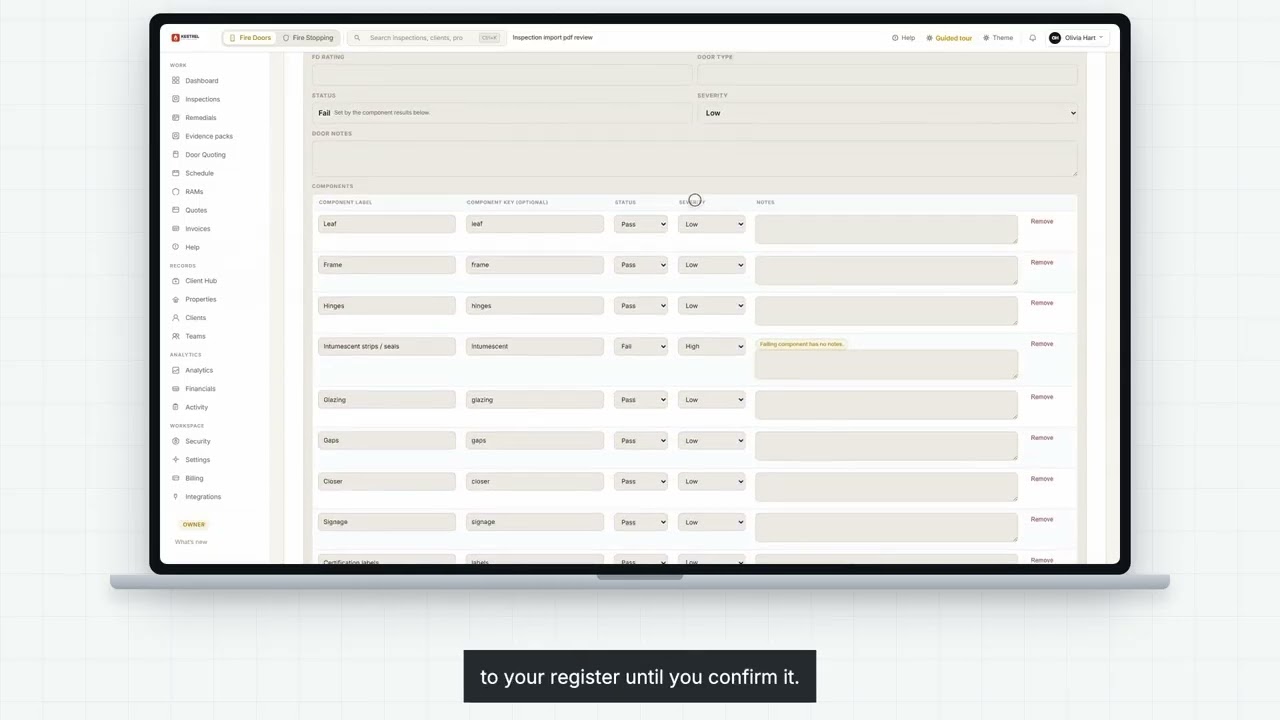
The contractor emails the PDF over (or drops it in a shared folder). You upload it through Import PDF — property, doors, components, pass/fail and notes extract with confidence scores, ready for review.
  • Drop the PDF into Import PDF in your workspace
  • Review extracted draft before anything is saved
  • Edit anything — confidence scores flag what to double-check
3
Plan
Plan
remedials
Commit to the master record and any flagged findings turn into remedials in the same workspace. No separate tracker, no parallel work-order system — outstanding work lives next to the evidence that raised it.
  • Remedials raised directly from imported findings
  • Outstanding, scheduled and complete visible per building
  • Schedule driven by what is actually outstanding
4
Reporting
Report
cleanly
PDF reports, CSV exports and live portal sharing all run from the consolidated record. Clients, auditors and end-of-contract handovers get the same single source of truth — never a folder of files.
  • PDF and CSV exports on demand for any building
  • Client portal shares live status without email threads
  • End-of-contract handover is a one-click export
Start today

Run one real building.
See the consolidated record form.

Pick one building, upload one contractor's PDF, and see how the master record forms across delegated capture. No card required, cancel anytime.

No card. Cancel anytime.

PDF consolidation Portfolio view Audit trail Multi-contractor Stakeholder reporting